Every tunnel, signalled.
Tunwarden starts your SSH and cloud tunnels, checks that each one really listens, reconnects what drops, and when a login expires it stops the tunnels with the reason and the one command that brings them back.
macOS, Windows and Linux · CLI and desktop app · free and open source
curl --proto '=https' --tlsv1.2 -LsSf https://github.com/Om-jannu/tunwarden/releases/latest/download/tunwarden-cli-installer.sh | shCLI for macOS. Free, MIT or Apache-2.0. No account, no telemetry.
RegisterDemo in your browser. Messages as the daemon writes them.
- Nothing yet. Every change of state is written here.
All three running. Try a lever.
- staging-dbrunning
- bastion-redisrunning
- prod-apiproductionrunning
curl --proto '=https' --tlsv1.2 -LsSf https://github.com/Om-jannu/tunwarden/releases/latest/download/tunwarden-cli-installer.sh | shCLI for macOS. Free, MIT or Apache-2.0. No account, no telemetry.
The same box, on your desk.
The desktop app shows every tunnel with its state and the reason it failed, and opens a tunnel’s log and its last 24 hours beside the list.
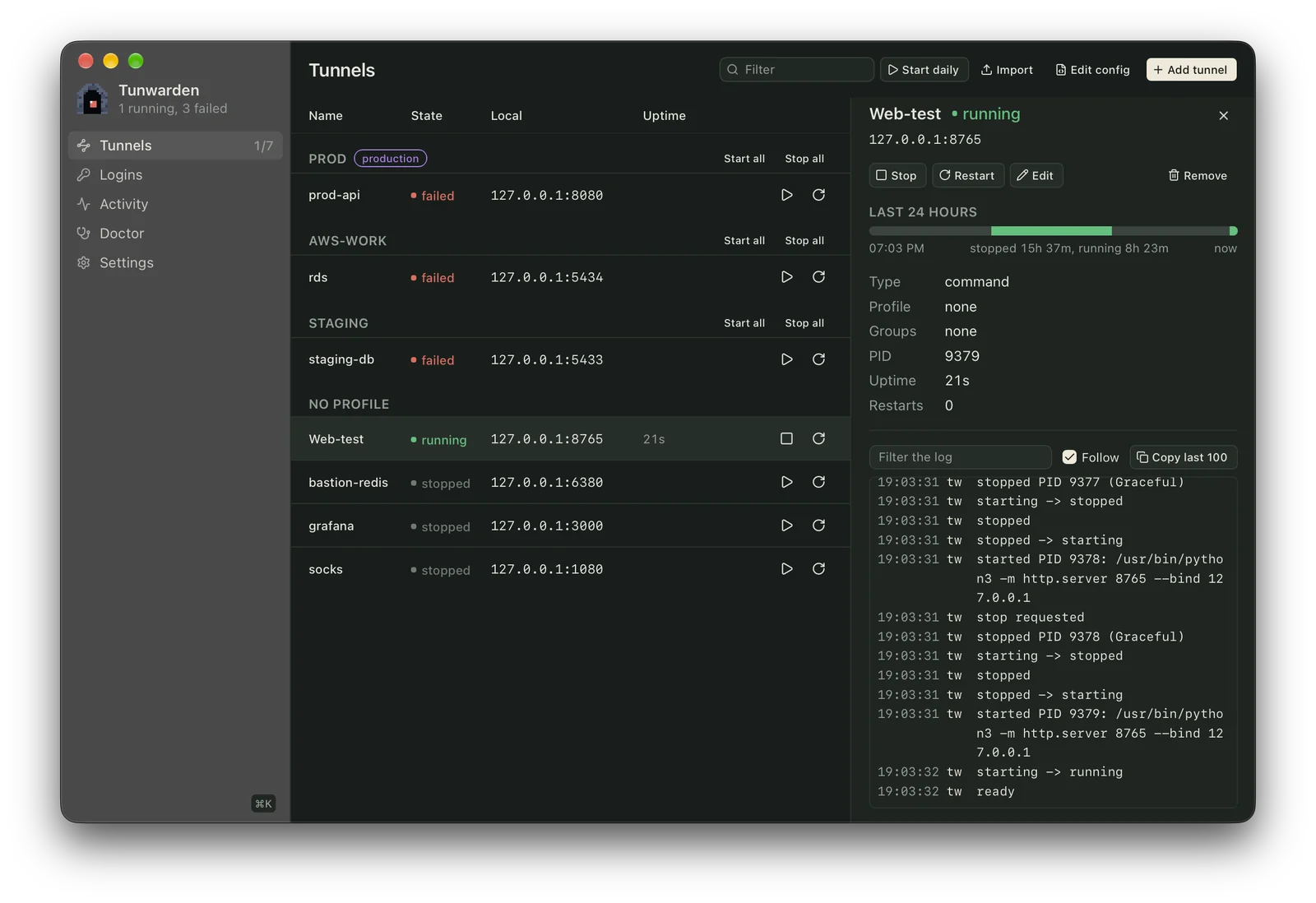
tunwarden init. Its hosts are made up, so most tunnels stop or fail, each with its reason.One login, and they come back.
The same thing as the levers, in a terminal. This is real output from tunwarden 0.1.0, captured on 27 Nov 2026 with demo tunnels and a stand-in login script.
Login expiresThe google login expires. The two tunnels that use it stop with the reason and the next step. The SSH tunnel does not use it and keeps running.
$ tunwarden status
NAME           STATE    LOCAL           PID    UPTIME  RESTARTS  DETAIL
bastion-redis  running  127.0.0.1:6380  47594  16s     0
prod-api       failed   127.0.0.1:8080  -      -       1         auth expired: the google login has expired; run `tunwarden login google`
staging-db     failed   127.0.0.1:5433  -      -       1         auth expired: the google login has expired; run `tunwarden login google`
One loginOne login. Tunwarden runs your own login command, then restarts what it stopped.
$ tunwarden login google
Running the google login (used by staging, prod): /tmp/twdemo/login.sh
You are now logged in as [me@example.com].
logged in; restarting prod-api, staging-db
BackBoth are back. Nothing else was touched.
$ tunwarden status
NAME           STATE    LOCAL           PID    UPTIME  RESTARTS  DETAIL
bastion-redis  running  127.0.0.1:6380  47594  21s     0
prod-api       running  127.0.0.1:8080  47683  3s      1
staging-db     running  127.0.0.1:5433  47682  3s      1
Box rules
Production tunnels sit next to staging ones, so Tunwarden is strict about what it will do.
- Production asks first
- Tunnels in a production profile do not start without a confirmation.
$ tunwarden start prod-api
error: refusing to start production tunnels (prod-api) without confirmation
hint: pass --yes to confirm
- No shell
- Commands run directly, never through a shell. Pipes,
&&and$VARare rejected; point the command at a script if you need them. - Local only
- Forwards bind to 127.0.0.1. Nothing listens on your network.
- Your logins stay yours
- Tunwarden stores no credentials. It runs the check and login commands you already use, such as
gcloud auth login. - Every failure says why
- A failed tunnel carries a reason and the next step, in the CLI, the app and the log.
- Nothing phones home
- No account, no telemetry, and no network calls of its own.
Any command that opens a port.
Tunwarden supervises the tools you already have. It is not a VPN and does not replace ssh, gcloud or kubectl; you describe each tunnel once, in one TOML file.
- ssh -L, -R, -D
- gcloud compute start-iap-tunnel
- kubectl port-forward
- aws ssm start-session
- your own script
version = 1

[[logins]]                        # something you renew now and then
name = "google"
check = "gcloud config config-helper --force-auth-refresh --format=none"
login = "gcloud auth login me@example.com"
expired = ["Reauthentication failed"]

[[profiles]]                      # environment, production flag and login
name = "staging"
login = "google"

[[tunnels]]                       # any command that opens a local port
name = "staging-db"
profile = "staging"
command = "gcloud compute start-iap-tunnel db-1 5432 --zone=europe-west1-b --local-host-port=127.0.0.1:5433"
groups = ["daily"]
forwards = [{ local_port = 5433 }]

[[tunnels]]                       # SSH forwards are built for you
name = "bastion-redis"
type = "ssh-local"
host = "bastion"
forwards = [{ local_port = 6380, remote_host = "redis.internal", remote_port = 6379 }]
Already have shell aliases? tunwarden import ~/.zshrc turns them into entries. How the config works
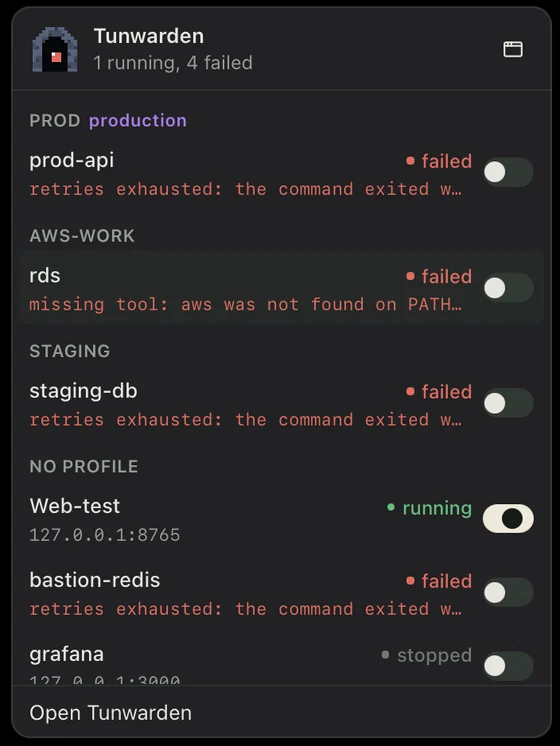
The lamp follows you to the menu bar.
The desktop app lives in the tray or menu bar. Its lamp shows the worst state among your tunnels, and the app and tunwarden status read the same daemon, so they never disagree.
- Running
- Connecting or reconnecting
- A tunnel failed
- Nothing running
Put your tunnels in the box.
curl --proto '=https' --tlsv1.2 -LsSf https://github.com/Om-jannu/tunwarden/releases/latest/download/tunwarden-cli-installer.sh | shCLI for macOS. Free, MIT or Apache-2.0. No account, no telemetry.